IIS中.NET Core报错HTTP Error 500.31 - ANCM Failed to Find Native Dependencies
2022-10-28 7125 1
在IIS部署.NET Core网站报错HTTP Error 500.31 - ANCM Failed to Find Native Dependencies。原因是需要安装.NET Core运行时和ASP.NET Hosting。

1 安装.NET Core运行时,目前最新的是ASP.NET Core 运行时 6.0.10(可以直接安装第二步的托管捆绑包)
.NET 6最新下载地址:https://dotnet.microsoft.com/zh-cn/download/dotnet/6.0

现在最新的下载页面上提示:在 Windows 上,我们建议安装托管捆绑包,其中包括 .NET 运行时和 IIS 支持。所以现在应该直接下载下面第2步的ASP.NET Core 6.0 Runtime (v6.0.10) - Windows Hosting Bundle Installer就可以了。
2 安装.NET Hosting,目前最新版本是ASP.NET Core 6.0 Runtime (v6.0.10) - Windows Hosting Bundle Installer!
https://dotnet.microsoft.com/zh-cn/download/dotnet/thank-you/runtime-aspnetcore-6.0.10-windows-hosting-bundle-installer

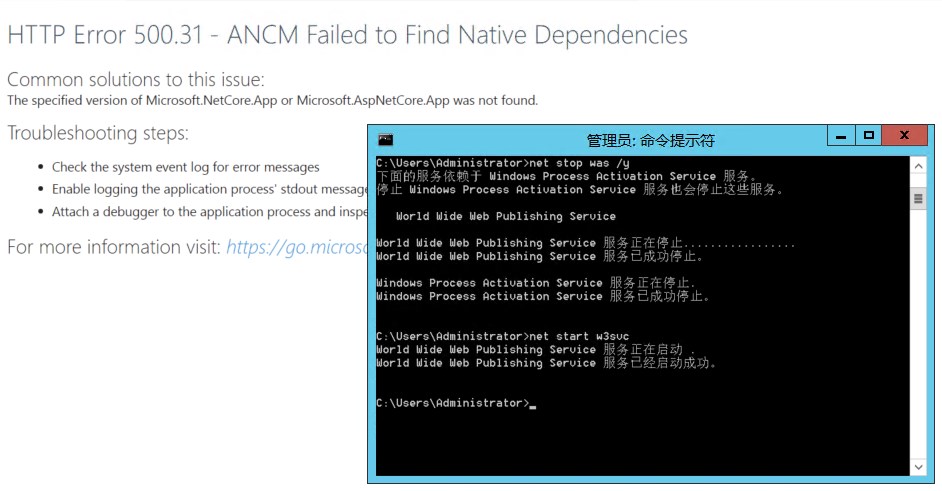
3 安装完成后重启IIS服务,可以手动重启WWW服务或者通过下面的命令重启
在命令行界面中执行 net stop was /y,然后启动 net start w3svc 。
4 和普通ASP .NET网站一下部署
创建一个站点,把程序池托管类型改为无托管代码即可。

NET Core网站上传文件时会使用临时文件夹,可能会出现没有访问临时文件夹的错误,解决方法参考这里:
.NET Core上传文件报Access xxx.tmp is denied错误
https://www.leavescn.com/Articles/Content/1193
匿名用户
IIS成功部署.NET Core网站,感谢分享!